2025. 8. 24. 12:40ㆍFrontend
AuthError.code 출력 시 API 버전 헤더 명시 필요
커스텀 헤더 노출 설정도 필요
또는 code 대신 error_code 필드명 사용
배경
Playwright를 사용해 Supabase API를 테스트하던 중,
AuthError 객체의 code 속성이 테스트 환경에서 모킹되지 않는 문제를 발견했어요.
이번 글에서는 문제를 어떻게 확인하고 해결했는지 단계별로 정리해봤어요.
문제 정의
Playwright로 Supabase API를 모킹했지만,
반환되는 AuthError 객체에서 code 속성이 정상적으로 전달되지 않았어요.
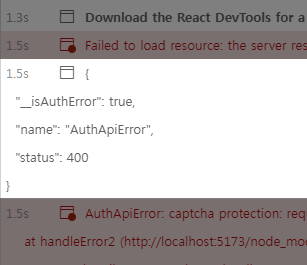
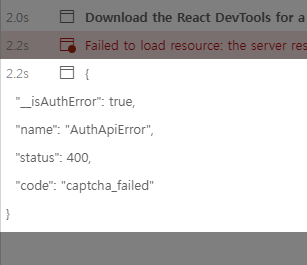
문제의 핵심은 code 값이 출력되지 않는 현상이었어요.
테스트 환경 및 오류 확인
다음 코드로 오류를 확인해 봤어요.
- 모킹한 Playwright 테스트 코드
// Supabase API 에러 모킹
async function mockSupabaseAPIError(page: Page) {
  await page.route(API_REQUEST_URL, (route) => {
    route.fulfill({
      status: 400,
      contentType: 'application/json',
      json: { code: 'captcha_failed' },
    });
  });
}
먼저 API에서 { status: 400, code: 'captcha_failed' } 응답을 반환하도록 모킹했어요.
- 클라이언트 오류 처리 코드
// AuthErrorHandler class, 오류 출력 부분 발췌
public handle(error: unknown) {
  ...
  // Supabase Auth
  if (isAuthError(error)) {
    const handler = this.authHandler[String(error.code)];
    // handler, undefined 문제 발생
    if (handler) {
      handler();
      return;
    }
  }

  // 해당 오류 문구 토스트 알림 발생
  this.show(`알 수 없는 오류가 발생했습니다.`);
  console.error(error);
}
모킹한 Supabase API에서 AuthError로 인지되지만,
code가 undefined라서 해당하는 authHandler를 찾지 못했어요.
authHandler 함수는 Supabase Auth error codes table을 기반으로,
code 오류 처리 함수를 값으로 가지고 있는 키-값 객체예요.
- Supabase AuthError 타입
// Supabase AuthError type
export class AuthError extends Error {
  code: ErrorCode | (string & {}) | undefined

  /** HTTP status code that caused the error. */
  status: number | undefined

  protected __isAuthError = true

  constructor(message: string, status?: number, code?: string) {
    super(message)
    this.name = 'AuthError'
    this.status = status
    this.code = code
  }
}
code 필드명을 명시했음에도 Playwright 테스트에서는 code 값이 반환되지 않았어요.
원인 추적 과정
1. 개발 모드에서 직접 오류 발생
API 오류 응답 자체를 모킹했을 때는 정상적으로 code가 포함되어 출력됐어요.
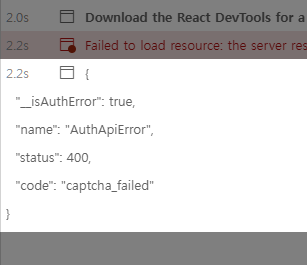
2. 응답 헤더 실험
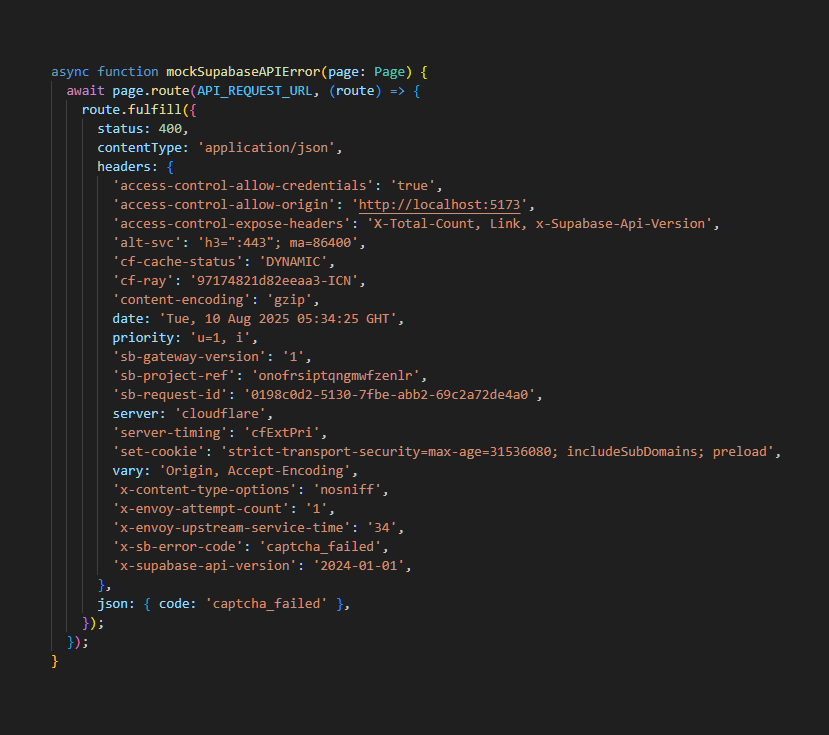
어떤 헤더가 문제였는지 헤더를 하나씩 제거하며 원인을 추적했어요.

확인해 보니 x-supabase-api-version,
access-control-expose-headers 헤더가 없으면
Supabase는 code 값을 처리하지 못했어요.
3. 코드 분석
supabase auth 라이브러리 코드에서
parseResponseAPIVersion 함수로 응답의 API 버전을 확인하고 있었어요.
버전이 없으면 errorCode 변수에 응답 본문의 code를 할당하지 않았어요.
그리고 error_code 필드명이 아닌 code 필드명으로 오류를 할당하고 있었어요.
// @supabase/auth-js/src/lib/fetch.ts
export async function handleError(error: unknown) {
  ...
  // AuthApiError에 전달될 오류 코드
  let errorCode: string | undefined = undefined;

  // responseAPIVersion: Date | null
  const responseAPIVersion = parseResponseAPIVersion(error);

  if (
    responseAPIVersion &&
    responseAPIVersion.getTime() >= API_VERSIONS['2024-01-01'].timestamp &&
    // data 변수는 fetch로 받아온 응답 객체
    typeof data === 'object' &&
    data &&
    typeof data.code === 'string'
  ) {
    errorCode = data.code;
  }
  else if (
    typeof data === 'object' &&
    data &&
    typeof data.error_code === 'string'
  ) {
    // 응답에 error_code 값이 있다면 errorCode 변수에 할당
    errorCode = data.error_code;
  }

  ...

  throw new AuthApiError(
    _getErrorMessage(data),
    error.status || 500,
    errorCode
  );
}
버전을 명시하지 않거나 필드명이 잘못되어서
AuthError 객체의 code가 비어 있었어요.
4. CORS 관련 주의
API 버전을 명시하는 경우,
커스텀 헤더 접근 시 access-control-expose-headers가 반드시 필요해요.
// @supabase/auth-js/src/lib/helpers.ts
/** Parses the API version which is 2YYY-MM-DD. */
const API_VERSION_REGEX = /^2[0-9]{3}-(0[1-9]|1[0-2])-(0[1-9]|1[0-9]|2[0-9]|3[0-1])$/i

export function parseResponseAPIVersion(response: Response) {
  // 헤더 접근 허용 사전 설정 필요
  const apiVersion = response.headers.get(API_VERSION_HEADER_NAME)

  if (!apiVersion) {
    return null
  }

  if (!apiVersion.match(API_VERSION_REGEX)) {
    return null
  }

  try {
    const date = new Date(`${apiVersion}T00:00:00.0Z`)
    return date
  } catch (e: any) {
    return null
  }
}
x-supabase-api-version 헤더는 기본 허용 헤더가 아니기 때문에
반드시 access-control-expose-headers: x-supabase-api-version를 설정해야 했어요.
해결 방법
Playwright에서 Supabase 오류를 모킹할 때,
다음 헤더를 반드시 포함해야 해요.
'access-control-expose-headers': 'X-Supabase-Api-Version',
'x-supabase-api-version': '2024-01-01'
이 두 헤더가 있어야 AuthError.code가 정상적으로 전달돼요.
만약 버전 헤더를 설정하지 않는 경우에는,
응답 본문에 error_code 필드를 사용하면 동작해요.
같이 보기
"feat: add support for error codes" - GitHub Supabase/auth-js
"feat: add error codes" - GitHub Supabase/auth
참고
- Auth error codes table - Supabase Docs
- Access-Control-Expose-Headers - MDN Docs
'Frontend' 카테고리의 다른 글
| PostgreSQL RLS(Row Level Security) 내부 동작 알아보기 (0) | 2025.10.11 |
|---|---|
| F5 새로고침으로 CDN 요금이 늘어날까? – CDN 의문점 정리 (0) | 2025.09.28 |
| Supabase에서 RLS 적용 후 UPDATE와 DELETE 에러가 반환되지 않는 이유 (3) | 2025.08.10 |
| motion 코드 속에서 찾은 popLayout의 위치 비밀 (1) | 2025.08.03 |
| Motion에서 overflow: hidden이 무시되는 이유와 해결 방법 (2) | 2025.07.27 |